
Note
Go to the end to download the full example code.
Coaligning EIS to AIA#
This example shows how to coalign EIS rasters to AIA images in order correct for the pointing uncertainty in EIS.
import matplotlib.pyplot as plt

import astropy.units as u
from astropy.visualization import AsinhStretch, ImageNormalize

import sunpy.map

from sunkit_image.coalignment import coalign_map
For this example, we will use a preprocessed EIS raster image of the Fe XII 195.119 Å line. This raster image was prepared using the eispac package.
eis_map = sunpy.map.Map(
    "https://github.com/sunpy/data/raw/main/sunkit-image/eis_20140108_095727.fe_12_195_119.2c-0.int.fits"
)
Next, let’s download the AIA data we will use as a reference image. We want AIA data near the beginning of the EIS raster and we’ll use the 193 Å channel of AIA as it sees plasma at approximately the same temperature as the 195.119 Å line in our EIS raster. We have stored this file on Github so we can download it directly.
aia_map = sunpy.map.Map(
    "https://github.com/sunpy/data/raw/refs/heads/main/sunkit-image/aia.lev1.193A_2014_01_08T09_57_30.84Z.image_lev1.fits"
)
Before coaligning the images, we first resample the AIA image to the same plate scale as the EIS image. This will ensure better results from our coalignment.
nx = (aia_map.scale.axis1 * aia_map.dimensions.x) / eis_map.scale.axis1
ny = (aia_map.scale.axis2 * aia_map.dimensions.y) / eis_map.scale.axis2

aia_downsampled = aia_map.resample(u.Quantity([nx, ny]))
Now we can coalign EIS and AIA using cross-correlation. By default, this function
uses the “match_template” method. For details of the implementation refer to the
documentation of skimage.feature.match_template.
coaligned_eis_map = coalign_map(eis_map, aia_downsampled)
INFO: Missing metadata for solar radius: assuming the standard radius of the photosphere. [sunpy.map.mapbase]
INFO: Missing metadata for solar radius: assuming the standard radius of the photosphere. [sunpy.map.mapbase]
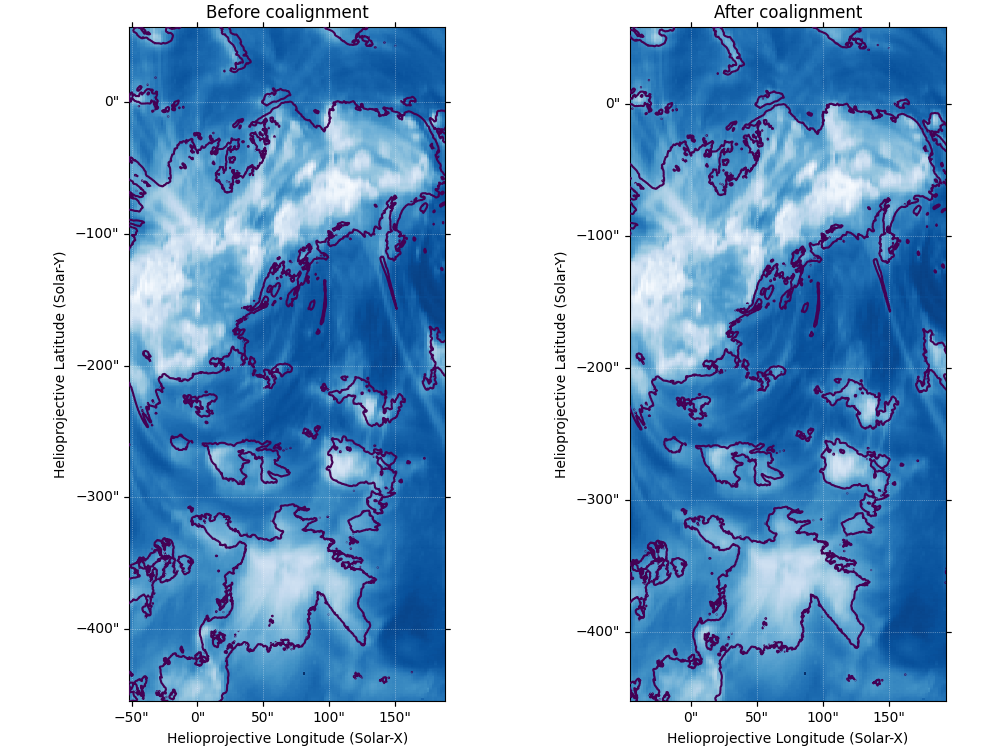
To check now effective this has been, we will plot the EIS data and overlap the bright regions from AIA before and after the coalignment.
fig = plt.figure(figsize=(10, 7.5), layout="constrained")
ax = fig.add_subplot(121, projection=eis_map)
eis_map.plot(
    axes=ax,
    title="Before coalignment",
    aspect=eis_map.scale.axis2 / eis_map.scale.axis1,
    cmap="Blues_r",
    norm=ImageNormalize(stretch=AsinhStretch()),
)
aia_map.draw_contours([800] * aia_map.unit, axes=ax)
ax = fig.add_subplot(122, projection=coaligned_eis_map, sharex=ax, sharey=ax)
coaligned_eis_map.plot(
    axes=ax,
    title="After coalignment",
    aspect=coaligned_eis_map.scale.axis2 / coaligned_eis_map.scale.axis1,
    cmap="Blues_r",
    norm=ImageNormalize(stretch=AsinhStretch()),
)
aia_map.draw_contours([800] * aia_map.unit, axes=ax)
INFO: Missing metadata for solar radius: assuming the standard radius of the photosphere. [sunpy.map.mapbase]
INFO: Missing metadata for solar radius: assuming the standard radius of the photosphere. [sunpy.map.mapbase]

<matplotlib.contour.QuadContourSet object at 0x75763da59370>
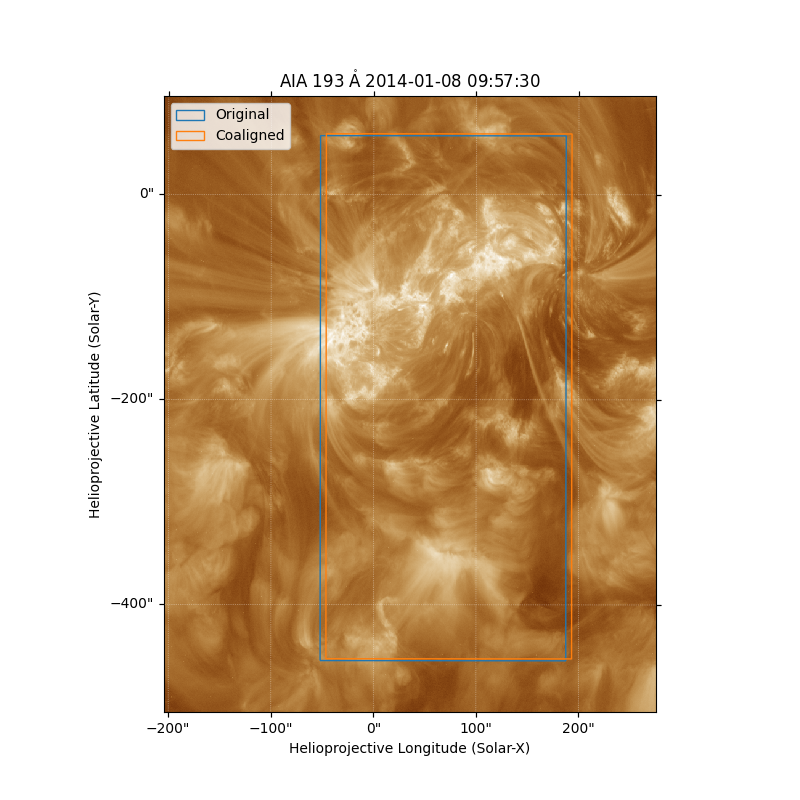
We can also visualize this shift by overlaying the extent of the two EIS maps on the AIA image we used to perform the coalignment.
fig = plt.figure(figsize=(8, 8))
ax = fig.add_subplot(projection=aia_map)
aia_map.plot(axes=ax)
eis_map.draw_extent(axes=ax, color="C0", label="Original")
coaligned_eis_map.draw_extent(axes=ax, color="C1", label="Coaligned")
ax.set_xlim(1700, 2500)
ax.set_ylim(1200, 2200)
ax.legend()

plt.show()
Total running time of the script: (0 minutes 25.706 seconds)